
What’s new

Changelog

The latest improvements to Gus, written for the people who work with him. Fresh context for your team’s agents, shipped often.

Improved

Every chat, right there in the sidebar
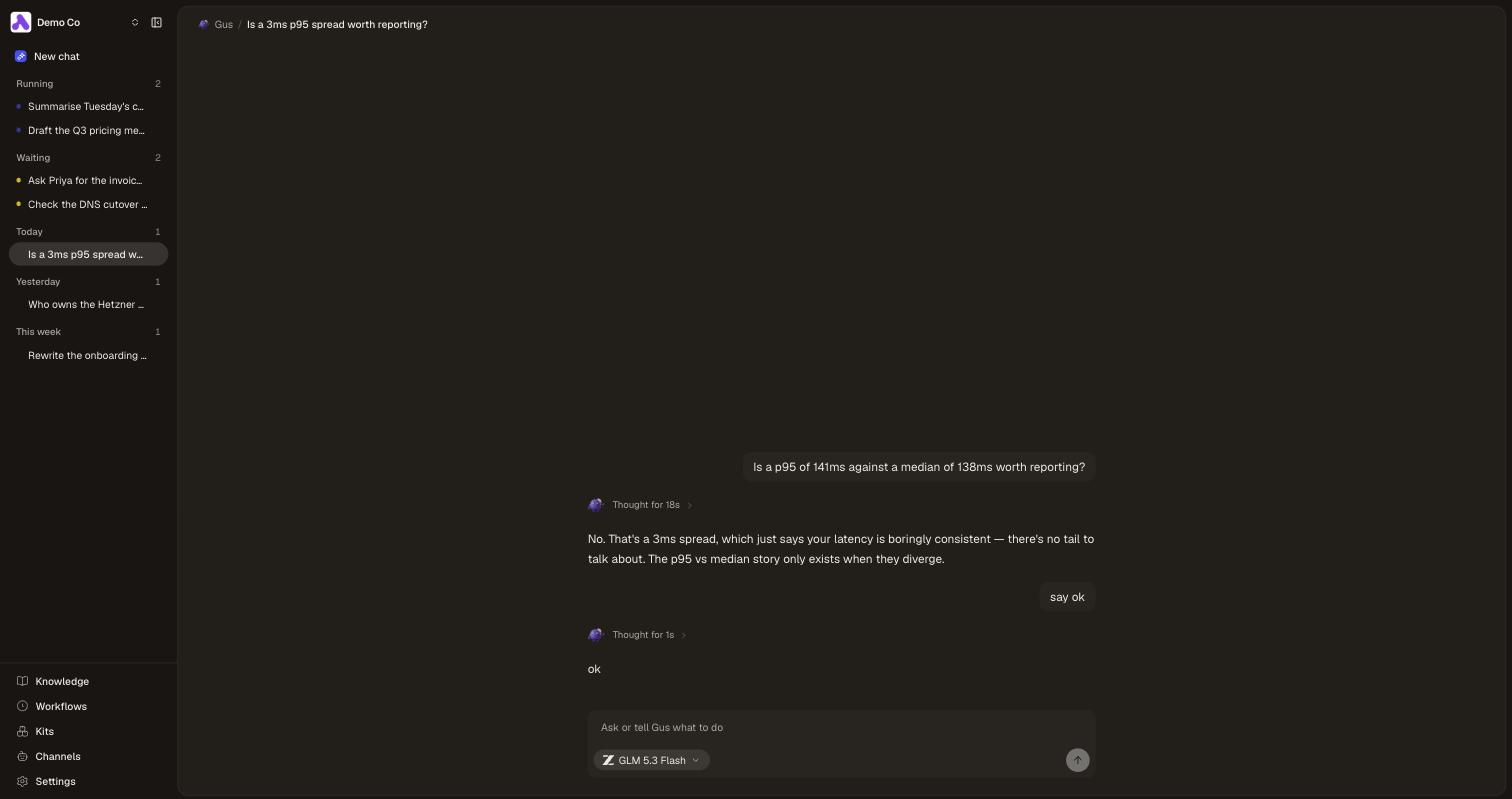
The Craftspace app with a left sidebar listing chats under Running, Waiting, Today, Yesterday and This week headings, the unfinished ones carrying a small coloured dot, beside an open conversation with Gus.

Your chats now live down the left. Anything still running or waiting on someone sits at the top, the rest fall under today, yesterday and this week. You can watch one answer while you read another, and the Work Board is gone because the sidebar does its job without a second screen.

September 2026

  1. Fixed

    No more blank answers from Gus

    Every so often Gus came back with “I could not produce an answer for that one”. That was never a real answer, it was his reply arriving empty and nothing catching it. Now he has another go on the spot, and if he still can’t get there he tells you what actually happened.

  2. New

    Gus is on Telegram now

    Press Connect, then scan the code or type it into Telegram, and Gus answers you there. It is your own chat, not the team’s, so he brings your spaces and the apps you have connected. Send him screenshots, PDFs or voice notes and he reads them, and type clear whenever you want to start a new conversation.

August 2026

  1. New

    Routines you keep to yourself

    Ask Gus in a DM to keep an eye on something and that routine is now yours alone. It sits in a Private section at the top of the Routines page, where nobody else on the team can see it, open it or stop it. Set one up in a channel instead and it belongs to everyone, same as before. You can hand a private one over to the team whenever you like.

  2. New

    See where Gus spends

    Settings has a Usage page now. It opens with how many days of credit your team has left at the pace it is going, then breaks the spend down four ways: day by day, where it happened, who it went to, and which models it ran on. If you have ever wondered whether Gus is worth what he costs, this is the page that answers it.

  3. Improved

    Run Claude Code on any model

    Claude Code used to be stuck with Anthropic’s own models. Now every model in the picker runs on it, so you can put GPT, GLM, DeepSeek or Kimi behind the agent that handles long multi-step work best. Pick the agent you want, then pick on price.

  4. New

    Put Gus on a schedule

    A routine is Gus on a clock: tell him what to check, how often, and which channel to post in, and he goes and does it while nobody is watching. He speaks up only when a run has something worth saying, so a quiet morning stays quiet. Ask him for one in chat and he sets it up himself.

  5. New

    Say where Gus reaches each teammate

    When Gus needs an answer from someone, he sends it to Slack, which he works out from their email address. If a teammate lives in Discord instead, match them to their account and flip them over. It is one toggle per person, so the one person who never opens Slack stops being everyone else’s problem.

  6. Improved

    One account for every Craftspace

    Signing in now goes through Craftspace itself, so the same account works whether your team is on craftspace.app or running Craftspace on its own server. Same six digit code to your email, nothing new to remember, and you stay signed in where you already were.

  7. New

    See what Gus is still waiting on

    When Gus does not know something, he asks the teammate who does and comes back with the answer. The Work Board shows every one of those still open, who is sitting on it and for how long, so a question nobody answered stops being something you find out about a week later. He follows up on his own now too, and tells you when he has stopped asking.

  8. Improved

    Know what synced and what you wrote

    A connected repo used to sit in the middle of the pages your team writes here, and nothing told you which was which. Repos now sit below Meetings and Customers with the rest of what comes in on its own, so the space above the line is only the work your team put there.

  9. New

    See which customers went quiet

    Customers is its own place now, and it opens on who you spoke to today, then yesterday, then further back. The companies nobody has touched in three months fold away at the bottom until you want them, so a quiet account is something you notice instead of something you go looking for.

  10. Improved

    A playbook is just pages now

    Write down how your team does a job the same way you write anything else. A playbook is a page, the steps inside it are pages, and every agent you connect reads them before it starts. No packages to build, no install step, nothing new to learn.

  11. New

    Support threads land on the customer

    Notetaker is now Sources, and it covers more than calls. Connect Pylon and every support thread your team closes shows up on the page of the customer that raised it, next to the calls you had with them. One page per company, with the whole story on it.

  12. New

    Your calls bring your customers with them

    Connect Attio and every call your team recorded there syncs across, searchable like the rest of your meetings. Each one also creates the customer it was with, so your customer list builds itself out of the calls you actually had instead of a list someone has to keep typing.

  13. Improved

    Gus follows the playbooks you write

    A playbook is how your team wants a job done, and Gus now sees every one you have added before he starts working. Ask for a customer proposal and he opens your playbook, uses its starter files, and asks the questions your team put there, instead of inventing his own version.

  14. New

    Gus asks before guessing

    Ambiguous work used to leave Gus guessing. It now pauses with one focused question in the web app, Slack, or Discord, then continues the original job as soon as you answer.

  15. New

    Keep Gus’s playbooks in Git

    Keep a playbook beside your company brain in Git and Craftspace brings it into Gus automatically. Change it in your repo and merge. Gus starts using it for the whole team, while an invalid edit leaves the last good version running.

  16. New

    Bring your own AI providers

    Settings now has an AI Providers page listing every company whose models Gus can think with, and a switch for each one. Turn off any you would rather never saw your pages, and paste your own key from Anthropic, OpenAI or OpenRouter to have them bill you directly instead of spending your Craftspace credit. Every row says which account its traffic leaves through, and each key shows what Gus has spent on it. We measure that, we never charge for it, and we never cap it.

  17. New

    Pick what an expert runs on

    Every expert now has its own page, with its pages, its apps, where it answers, and which model it thinks with, all in one place. The menu lists models by who makes them, from GPT and Claude to Kimi, GLM, Qwen, Grok and DeepSeek, with the price of each one next to it. Pick a cheap one for a busy channel or a heavy one for the expert doing the hard work, and it all comes out of the same team credit as before.

  18. Fixed

    Stopping Gus keeps his work

    Press stop and everything Gus had already found stays in the chat, with a line marking where he stopped. It used to disappear, which looked a lot like your chat had been deleted. Gus also tells you plainly when a connected app needs authorizing again, and where to sort it out, instead of acting like the app was never there.

  19. Improved

    Gus shows his work in Slack

    Mention Gus and he reacts with 👀 right away, then narrates what he is doing while he digs: searching, reading, saving. When the answer lands your message gets a ✅, plus a 📝 whenever he saved something to your team's pages. Discord gets the same treatment.

  20. New

    Decisions survive the thread

    The reasoning behind a conversation used to disappear as soon as everyone moved on. Gus now saves the strongest settled decision, or updates the page that already covers it, when you talk in the web app, Slack, or Discord.

  21. Improved

    Meetings, down to one button

    The Meetings page is now a single promise: connect your Google Calendar and a notetaker joins your calls. Every transcript lands on the same page, searchable by your whole team and the agents you already use.

  22. Improved

    See what Gus did, in plain words

    While Gus works, every step reads like a sentence: what he searched, which page he read, what he ran. When the answer lands, the steps fold behind one quiet line, and any step opens to show what came back, with search results you can click straight into.

  23. New

    Gus can use your connected tools

    Ask Gus to check an issue or query your data, and he works through the tools your team already connected. Share a tool with an assistant the same way you share it with a teammate, and it shows up right in the sharing list.

  24. New

    Gus answers in Discord

    Connect your Discord server right next to Slack and mention Gus in the channels you choose. He opens a thread, works with your team’s pages behind it, and answers there.

  25. Improved

    Find things by their real names

    The sidebar now follows the work you come back to: your knowledge base, meetings, skills, assistants, and MCPs. Setup has clearer homes too, so repository sync and your own agent setup no longer compete for the same words.

  26. Improved

    Setup is one page now

    Getting started used to be a five item checklist tucked in the sidebar. Now it is one page with one job: connect Slack, click the channel Gus should answer in, and go ask him something. No forms to fill in.

  27. New

    See exactly what changed

    Click any change in Activity and you now see the edit itself: the old wording in red, the new wording in green. No more opening the page and guessing which sentence moved.

  28. New

    Ask Gus without leaving the page

    Gus now waits at the bottom of every screen. Open the dock anywhere to carry on the same conversation while you read, drag it along the edge when it is in your way, and send it back to full screen when you want the room.

  29. New

    Send a call to someone outside

    Every meeting now has a Share menu, right on the list and on the call itself. Open it to hand the call to your team, or put it on a public link anyone can read without an account. Turn the link off and every copy of it stops working.

  30. Improved

    See your meetings coming in

    Every meeting source now says what it is doing. Watch the count climb while your calls are pulled in, see when the last one finished, and get told in plain words if the key stopped working instead of waiting for calls that were never coming.

  31. New

    Ask your agent for a share link

    Gus and the agents you already use, Claude Code, Cursor, Codex, can now put a page on a public link and hand you the link, or take it back off. Say "share the onboarding page" and paste what comes back. Turn it off and every copy of that link stops working.

  32. Improved

    See exactly what Gus did

    Every step Gus takes now says what it was, in your words, with how long it took beside it. Open a step to see what it looked for and what came back, in plain English, and jump straight to the page it touched.

  33. New

    Share a page with anyone

    Any page can now have a public link. Send it to a customer, a contractor, or a candidate and they can read the page without an account. Turn sharing off and every copy of that link stops working, so nothing stays open by accident.

July 2026

  1. Improved

    Craftspace works on your phone

    Every screen now fits a phone. The sidebar tucks away behind a menu button, your pages and settings read at full width, and the buttons are big enough to actually tap. Look something up on the way to a meeting, or fix a page from the sofa.

  2. Improved

    Gus shows his work in order

    A reply used to arrive back to front, with the answer on top and everything Gus did to get there piled underneath. Now a reply reads top to bottom the way it happened, and his thinking sits folded in place, there when you want to check it and out of the way when you do not. Rearranging pages is quicker too, so asking him to tidy a space takes a fraction of the time.

  3. New

    Make the repo the only way in

    If a space is backed by a GitHub repo, you can now let the repo be the only thing that changes it. Every edit arrives as a pull request someone reviewed, which matters most on a public repo, where a bad write is out there for good.

  4. Improved

    Gus replies faster, and shows his thinking

    Gus used to go quiet for up to a minute before he said anything, which mostly looked broken. Now a reply starts in a couple of seconds, and you can watch what he is working through while he goes.

  5. New

    Diagrams, drawn for you

    Describe a flowchart, a sequence, or a bar chart in a code block and the page draws it. Your agents can write one straight into a page, so a process or a set of numbers arrives as a picture instead of a wall of text. Click the drawing when you want the text back.

  6. Improved

    See who changed what, at a glance

    The activity list on every space now says what happened in words as well as colour: added in green, edited in amber, deleted in red. Each line also names the person who really made the change, read from the commit rather than from whoever connected the repo, and shows their address when nobody on your team owns it yet, so you know who to invite.

  7. Improved

    Always know where you are

    Deep in a page, it was easy to lose track of which space you were in. Every screen now opens with a trail across the top: click a step to head back out, and a tag beside the title says what you’re looking at.

  8. New

    Back your brain with a GitHub repo

    Connect a space to a GitHub repo and its pages, skills, and decisions live there as plain files you can review in pull requests and search on disk. Change the files and merge, and Craftspace follows. Repo-backed pages stay read-only in the app, so GitHub remains the source.

  9. New

    Attach reports to any page

    Drop a JSON or PDF report onto any page, or let your agent add one for you, and it lives with the page for good. Click a PDF to read it right beside the page, and search finds a page by what’s inside its attachments, not just its own words.

  10. Improved

    Know which brain you’re connecting

    When an agent asks to connect, the approval screen now names the company brain it will read and write, so you’re never guessing. Each connection is named after its company too, so if you’re in more than one, a second one can’t quietly write into the first.

  11. Improved

    See a decision’s status at a glance

    Open a decision and its status now shows right next to the title, the same mark you see beside it in the sidebar. Proposed, accepted, superseded, or turned down reads instantly, without opening the menu.

  12. Improved

    Sharper notes back to your brain

    Your agents got better at telling a keeper from noise. They skip the one-off stuff, save decisions and gotchas the way a teammate would write them, and add to an existing note instead of leaving a duplicate. We measured the difference and wrote up how, over on the blog.

  13. New

    Every project gets its own space

    Running more than one project at your company? Each one now lives in its own space, so a client’s pages, skills, and decisions never spill into another’s. Switch to the project you’re in and everything your agents read and write stays right where it belongs.

  14. Improved

    Setup that points at the right space

    The connection link on your Setup screen now carries the space you’re in. Paste it into Claude Code, Cursor, or Codex and your agents land in the right one. Switch spaces and the link follows you.

  15. New

    Share your team’s tools, not just its docs

    Connect the apps your team already runs and hand their tools to everyone’s agents in one place, no copy-paste. You pick exactly which tools each connection opens up, so people get what they need and nothing they don’t.

  16. New

    Sign-in stays on your team

    Only people on your company’s email domains can get in, so your shared context stays inside the company. Bringing in a contractor? Add their email to the list and they’re through.